DateFlow AI for monday.com
AI Scheduling, Working Days & Timeline Duration Engine. Parse natural language prompts like “3 business days before today”, calculate true working days without weekends or holidays, and push live duration metrics into native Numbers columns.
Automated Timeline & Scheduling Pipeline
From natural language prompt ingestion to locked timezone dates and working duration metrics, DateFlow AI manages dates flawlessly across all your boards.
Designed to Supercharge monday.com Timelines
Experience the premier scheduling app that turns complex date formulas and fragile timezone shifts into seamless, zero-maintenance automations.
Turn Natural English Prompts into Locked Board Dates
Stop manually calculating calendar offsets in your head. Type prompts in plain human speech like “3 business days before today”, “next Friday at 4pm”, or “end of sprint milestone”. DateFlow AI parses the context and writes the exact calendar date directly to your monday.com Date column.

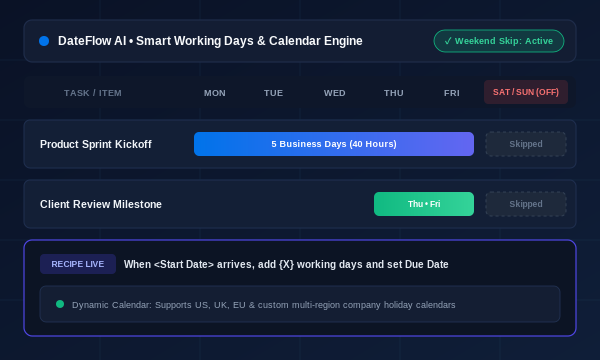
Automatic Weekend & Custom Holiday Skipping Dependencies
Real businesses don't work 7 days a week. When a client deliverable needs 10 business days, default calendar arithmetic causes missed deadlines by treating Saturdays and Sundays as working time. DateFlow AI intelligently leaps over non-working days.
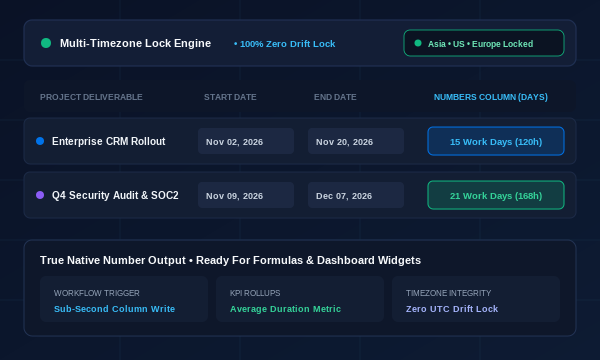
Duration Calculator & Timezone-Locked Output
Need to know the exact working duration between a Start Date and an End Date? DateFlow AI calculates business day intervals and writes the clean value straight into a native Numbers column — ready for dashboard widgets and executive rollups with zero ±1 day timezone drift.
Up and Running in 60 Seconds
Follow three effortless steps to activate automated date arithmetic across your monday.com boards.
Install from Marketplace
Open your monday.com workspace, browse to the App Marketplace, search for DateFlow AI, and click Add to Board.
Choose Columns & Rules
Pick your source date or natural language prompt column, choose your destination date or numbers column, and specify your working days rules.
Turn on Automations
Hit Activate. Whenever tasks are assigned, updated, or shifted, DateFlow AI recalculates dates instantly and fires downstream automations.
Start Free, Choose a Plan Later
Get started for free, upgrade anytime to a plan that works for your team.
Free
- This plan suits small workflows with up to 250 ops/month.
- Natural Language Date parsing
- Standard weekend skipping
Starter
- This plan suits small workflows with up to 1000 ops/month.
- Duration Calculator into Numbers column
- Timezone-locked synchronization
Basic
- This plan suits small workflows with up to 2500 ops/month.
- Custom company holiday calendars
- Unlimited users & multi-board recipes
Pro
- High volume operations per month
- Sub-second webhook execution guarantee
- Dedicated developer priority support